
When you see the error for reaching max historical concurrent level jobs, or you get frequent messages like “waiting for queued job to start”, you are hitting either the User-level concurrent jobs limitation, the role level concurrent jobs limitation, or the system level concurrent jobs limitation. We will talk through each of these, where to find them, and how to adjust them.
To start at the highest level of the limitations, we will talk through what dictates the OS level limits. It is a simple calculation of settings in limits.conf. Calculation is max_hist_searches = max_searches_per_cpu x number_of_cpus + base_max_searches. By default, these settings are:
⦁ Max_searches_per_cpu: default of 1
⦁ Base_max_searches: default of 6
So our calculation for any given search head with default values in the HDSupply environment would look like this: max_hist_searches = 1 x 18 + 6 to give us an os limit per search head of 24 searches being ran at the same time. If they are being load balanced properly, it helps alleviate this as users should be spread between the 6 search heads at a given time. But still, this is a relatively low limitation when you consider the eBiz_SLT dashboard has 20 panels by itself, and the dashboard auto refreshes when any user leaves it up on their screen. When you add in scheduled searches, alerts, reports, adhoc searching, other apps and dashboards, you can see how this limitation can be reached relatively quickly.
For the sake of these changes, we will be modest with each change as to not overwhelm our search heads as we get more resource utilization and performance out of them.
Lets create an app in $SPLUNK_HOME/etc/SHCluster/apps to hold our limits.conf that will contain our updated settings. Follow your naming if you have one, but something like “hds_shc_limits” will work.
On the search head, especially where Data Model Accelerations are utilized, we will add the following. The below settings are implemented by EVERY PS Consultant who installs and configures Enterprise Security, BUT it is useful on adhoc search heads that are under utilized as well.
#this is useful when you have ad-hoc to spare but are skipping searches (ES I’m looking at you) or other
# home grown or similar things
[scheduler]
max_searches_perc = 75
auto_summary_perc = 100
Evaluate the load percentage on the search heads and indexers including memory, cpu utilized and memory utilized. We can increase the value of base_max_searches in increments of 10 to allow more concurrent searches per SH until one of the following occurs
⦁ CPU or memory utilization is 60% on IDX or SH
⦁ Skipping /queuing no longer occurs (increase by 1-3 additional units from this point to provide some “head room”
⦁ Messages for reaching the historical limit are no longer received.
⦁ Messages for “waiting for queued job to start” are no longer received.
We can also increase the number of max_searches_per_cpu BUT since this is a multiplier, please do it modestly. Start by increasing it incrementally, while reverting back to the previous check list items.
Our initial changes in limits.conf will look like this:
[scheduler]
max_searches_perc = 75
auto_summary_perc = 100
[search]
max_searches_per_cpu = 2
base_max_searches = 16
Now our new calculation per search head with these modest adjustments look like this:
max_hist_searches = 2 x 18 + 16 to give us a new limit of 52 searches to be ran at a time per search head.
Next, we have to consider the User-level concurrency limitations. If you are logged in as admin then click on Settings Access Controls Roles User
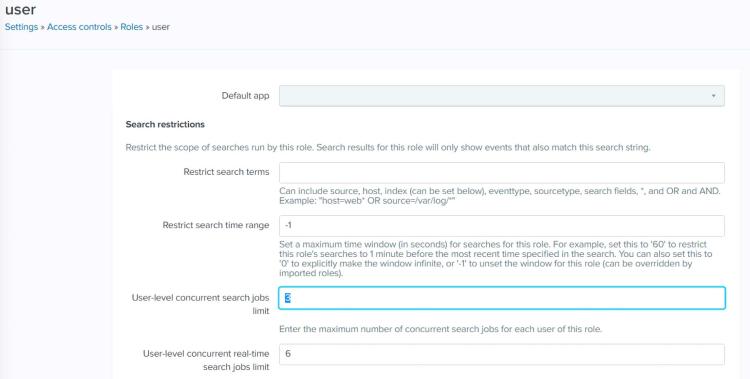
You can see, the User-level limitation for our User role, is set to 3 concurrent jobs. Meaning any account logged in an account with this role will only be able to run 3 simultaneous jobs. There are a couple of options here to help alleviate. There is the obvious answer in raising these limitations to something more userful and relevant for the environment. You can also make use of reports on dashboards owned and dispatched as a power or admin user that has higher privileges instead of using inline panels on every dashboard.
While we’re here, I’d like to mention that there is NEVER a legitate reason to use REAL TIME searching. I would remove this capability for any role other than admin and reserve for people who understand the implications of running real time searches.
Running real time searches indefinitely hogs up an entire core of a search head the way it is currently configured today. Real time alerting is even worse as it permanently and indefinitely hogs up an entire core because the job for that alert would literally never finish.
 chaseyates.com