At the end of 2020, as some of you might remember, there was a massive vulnerability that became known as the Solar Winds vulnerability. And in the wake of the SolarWinds vulnerability, I thought it would be helpful to put something together to talk about how critical mapping out your security monitoring coverage truly is. Almost everyone in the security industry has at least heard of the MITRE ATT&CK Framework, but very few make an intentional effort to understand how to begin operationalizing it. As a Splunk Security Consultant, I’ve spent time with customers of all sorts of varying degrees of security monitoring maturity. Very few of them had been intentional with their security monitoring. Almost every Enterprise Security implementation I have done has led to customers just looking to enable an arbitrary number of use cases with no plan as to how they decide which correlation searches they should enable. There is both a hard and soft limit to the amount of use cases Splunk infrastructure can support based on the allocated resources so it is critical for customers to learn to be calculated with their detections.
The first step in being calculated in your detections is identifying a framework that makes sense for your organization. With many to choose from like CIS Top 18, MITRE, Cyber Kill Chain, etc, there are tons of options for scaling your security monitoring and growing your overall maturity. For the sake of this post, we will talk about aligning your monitoring to the MITRE Framework. We will also talk about what MITRE is and how to utilize it at different stages in your maturity. Many customers are really just getting their feet wet in the world of Threat Hunting and Cybersecurity Threat Intelligence (CTI). This post will serve as a basis to help get you started in the world of MITRE and operationalizing its framework to help you grow your security monitoring maturity. As you grow, you will be able to track your growth via heat maps which will allow you collect and present metrics as you scale both your team and your monitoring capabilities.
How the SolarWinds Breach Relates to MITRE
Unless you’ve been under a rock for the past few months, I am sure you’ve heard about the massive SolarWinds vulnerability dubbed Sunburst by the guys who originally discovered it over at FireEye. If not, you can read more about it here. This SolarWinds vulnerability really called to attention, how critical it is to effectively map out your security monitoring strategy. This is because Sunburst is a highly evasive Supply Chain attack that gave threat actors associated with APT28 a back door into many commercial and government network systems. I won’t go into details on how they did it but you can read the report from FireEye above for more detail. How this comes back to MITRE is the fact that a Supply Chain attack is a wildly used and known technique for threat actors to deliver their malware. This wildly used TTP is in fact, tracked on the MITRE ATT&CK matrix of Enterprise TTPs. That’s not say to, ensuring you have a preventive measure or a detection geared towards that technique would have stopped this highly sophisticated attack. But ensuring your coverage maps from reconnaissance all the way to data exfil ensures you are in place to detect an attack at some point in its process. And the more TTPs you cover, the better your chances are of an effective detection or prevention.
What is MITRE att&ck
First, let’s define a couple of key terms:

Tactic: An adversary’s tactical reason for carrying out an action – what are they trying to accomplish?
Technique: The action behind how an adversary will achieve their goal – how they will reach their tactic.
Sub-technique: A more granular method to which an adversary will carry out their technique. – I.E. a technique may be Autostart execution under the tactic “Persistence” but there are 12 different ways, or sub-techniques, an adversary can carry out the autostart execution.
MITRE ATT&CK is a globally-accessible knowledge base of adversary tactics and techniques based on real-world observations of cyber security threats. Contributions are driven by the cybersecurity community as a whole, allowing anyone to participate in its development. Cyber Threat Intelligence (CTI), tracking threat actors, and active threat hunting is much more involved than just ensuring you are monitoring for some IOCs you’ve got in a CSV. Referencing the MITRE as the basis of your security operations can undoubtedly increase your security monitoring effectiveness by helping you identify your gaps, target your detection effort, and ensure end-to-end monitoring over the Cyber Kill Chain.
When you consider the fact that the MITRE knowledge base has over 14 of the most widely used cyber threat tactics with their associated techniques, ranging from Reconnaissance to Persistence, Lateral Movement, all the way down to data Exfil, you can see how cross referencing your monitoring against MITRE can quickly help you identify your gaps.
| Tactic Name | # of Techniques | # of Sub-techniques |
| Reconnaissance: | 10 | 31 |
| Resource Development: | 6 | 26 |
| Initial Access: | 9 | 10 |
| Execution: | 10 | 20 |
| Persistence: | 18 | 79 |
| Privilege Escalation: | 12 | 77 |
| Defense Evasion: | 37 | 111 |
| Credential Access: | 14 | 35 |
| Discovery: | 25 | 11 |
| Lateral Movement: | 9 | 12 |
| Collection: | 17 | 18 |
| Command and Control: | 16 | 22 |
| Exfiltration: | 9 | 8 |
| Impact: | 13 | 13 |
From a maturation perspective, not every customer is prepared to fully operationalize the MITRE framework. But don’t let the lack of maturation prevent from just starting down the path. Like anything else, progress begins with the first step.
how do I begin operationalizing MITRE att&ck
For the first iteration of this, I’ll walk you through making use of existing MITRE heat maps – threat groups currently tracked by MITRE – and cross referencing your security monitoring against those heat maps. We will also talk about resources to use to create your own heat maps.

MITRE ATT&CK tracks many different threat actor groups and maps their tactics and techniques to their framework via downloadable heat map. These heat maps can be uploaded to the ATT&CK navigator located here. In total, there are 109 threat groups being actively tracked by MITRE in its current version. These groups include the infamous Fancy Bear (APT28) responsible for both Sunburst and the DNC hack of 2016.
First, let’s navigate to the Fancy Bear tab on the MITRE website, located here. Once here, we can find tons of information the community has collected on APT28, including any known associated groups, major attacks they are associated with, all techniques they are known to use, any known malware associated to them, etc. But what many don’t realize is, MITRE maintains a heat map of their tactics and techniques and you can download it directly from this page.
To get started, lets scroll down to the section labeled “Techniques Used” under the APT28 information page. At the top right of this section, you’ll see a dropdown titled ATT&CK Navigator Layers. Here, you can either view or download the ATT&CK Navigator Layer. In our case, we’ll view it to save ourselves the hassle of recreating it.

Clicking “view” will open the TTP heat map for APT28 in a new browser tab. Here, you can track known TTPs of the group all the way through their life cycle, spanning from Initial Access all the way to Exfiltration and even Impact.
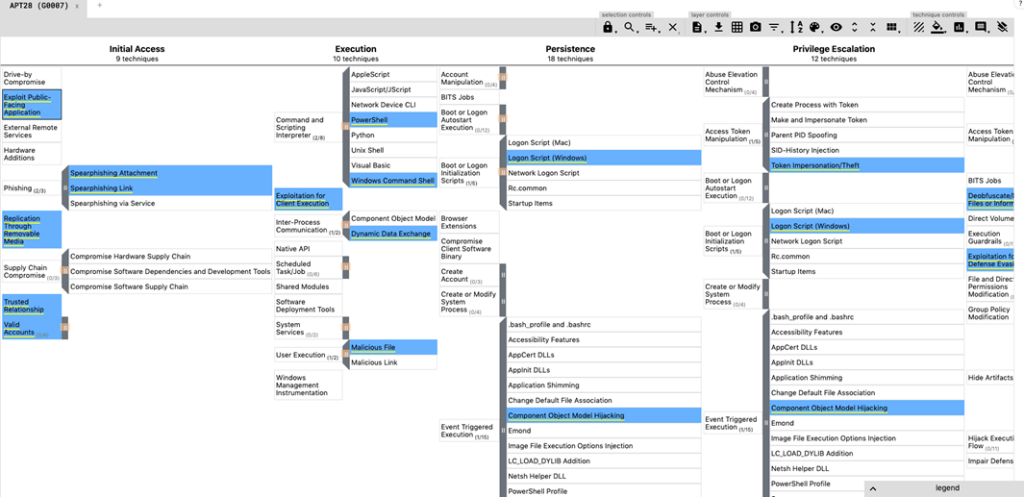
We only used one APT group in our example above, but you can overlap many APT group TTPs onto a single layer by adding additional tabs. I’ll show you how to overlap APT3 onto the same layer below.
Click the + beside your current tab to create a new Enterprise layer. Once you have a blank layer, navigate to the multi-select option on your toolbar. Once you click that, you’ll see a dropdown of all threat groups MITRE currently tracks. Scroll down until you find APT3 and then click “Select”.

At this point, you should have noticed a slight change to your table. Now let’s adjust the color. If you look a little further to your right on the nav menu, you’ll see an option for scoring. You probably didn’t realize, but your first tab already had a scoring of “1”. If it didn’t please make sure you go back and correct it.
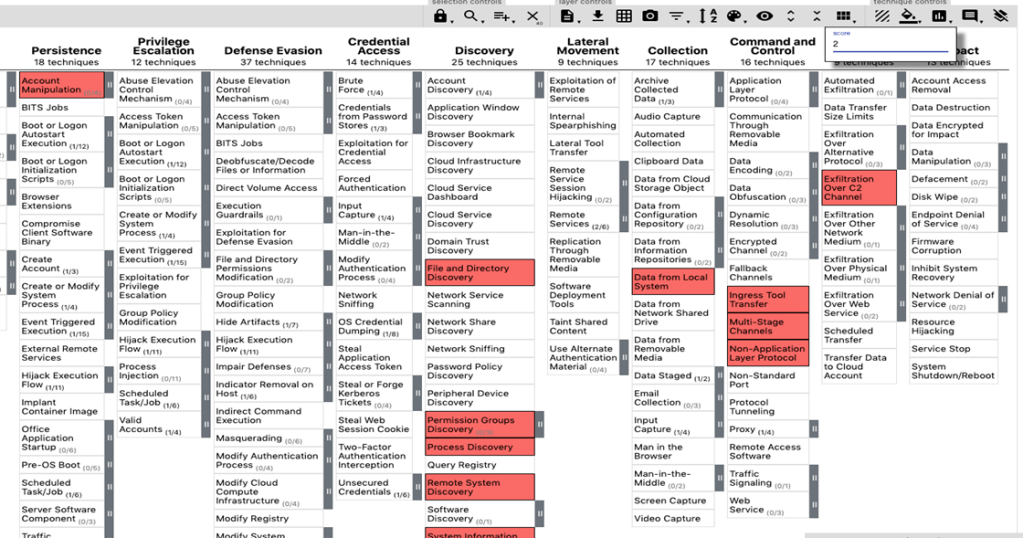
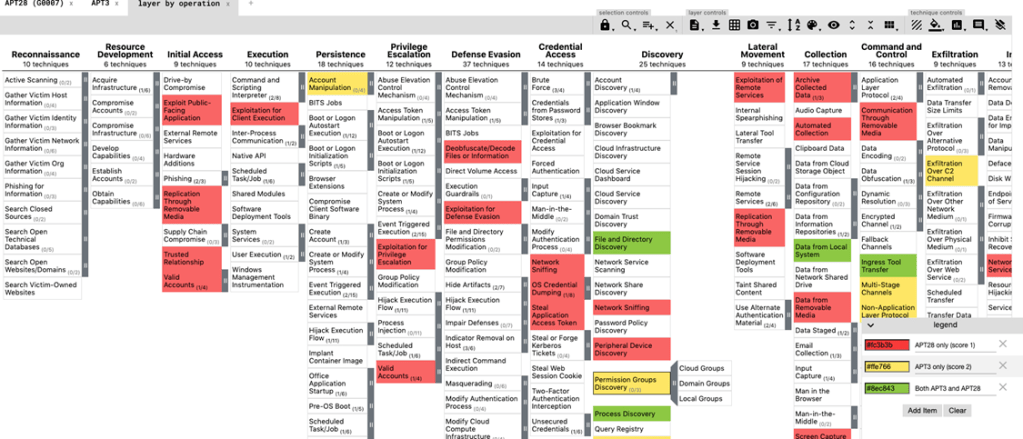
Let’s put a “2” in this scoring column and watch our layer automatically adjust color for us. Now we need to combine our 2 layers. Click the + to create another new tab. This time, we will create our layer from other layers. Make sure you select “Enterprise ATT&CK v8” as your domain. You should see identifiers at the top of your original tabs highlighted in yellow. We’ll use these identifiers to combine what we have. In my case, my original layers are “a” and “b”. So under our scoring expressions, I’ll enter “a+b”.
Once you click create layer at the bottom of your page, you’ll see your newly created heat map that spans both APT3 and APT28. This scoring and heat map system will help you establish priority after your gap analysis. You can create a legend here as well to quickly help people understand what your colors mean. If you remember, we set a scoring system on the previous two tabs that make this part easier.
Mapping your network visibility
Now that you’ve started mapping TTPs of your first threat groups, let’s take a look at how you can do your gap analysis. The first step is understanding what data sources you have in your environment. This helps you in determining what tools your organization lacks, what you may own but have not onboarded into your SIEM, etc.
For every technique, ATT&CK has listed which data source you will need to have for detection. It’s worth noting, MITRE’s data source list is not entirely comprehensive, but more-so just a broad indicator of the types of devices that will help you detect the technique.
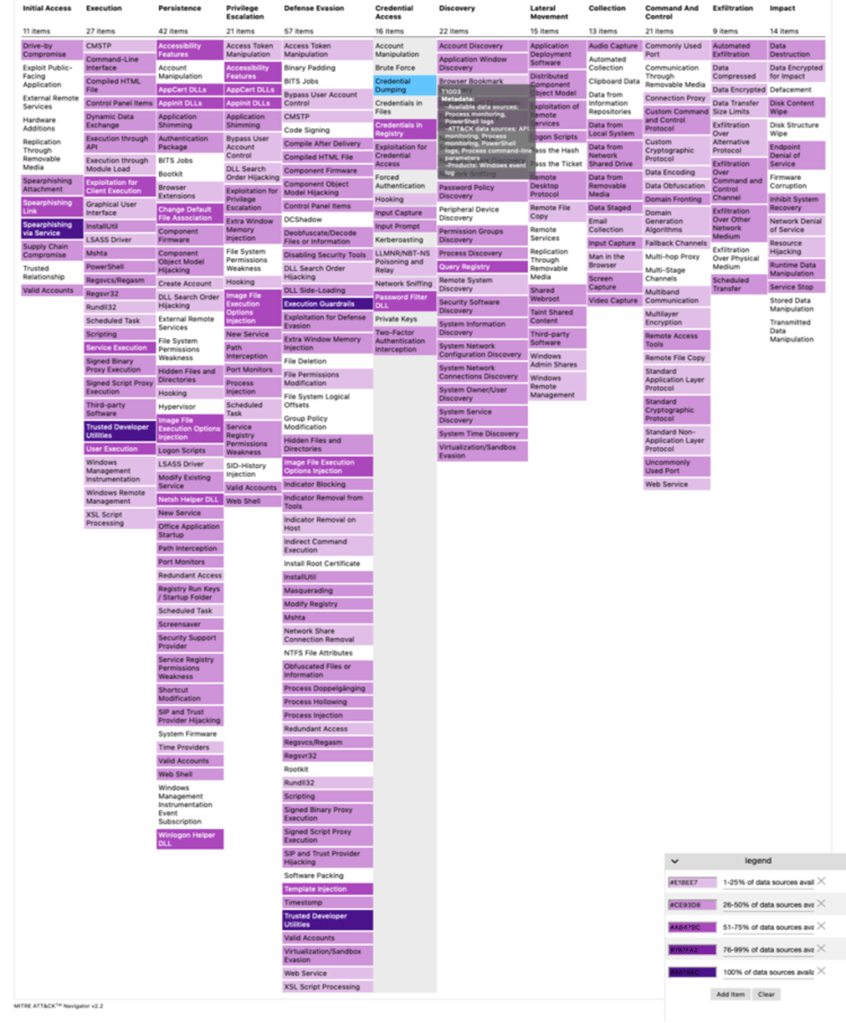

Admittedly, this manual process can take some time and effort, but it is well worth it. Visualizing your monitoring potential starts with understanding what your current options are. From there, you can identify gaps in your security posture to see what tools your organization may be completely missing that you can benefit from (like sysmon data).
Mapping your detections
Continuing with our manual process, MITRE also offers mitigation and detection suggestions for each technique. Create a layer that maps not only your SIEM use cases, but also your preventive measures. This would likely require the same merging process we did above, but understanding where your gaps lie not from a monitoring perspective, but also a general posture perspective is critical.

We understand this process can be tedious but for Splunk customers, you have a saving grace! Splunk Security Essentials maps all OOTB Splunk use cases to the MITRE framework to make it easily identifiable. They have even gone as far to host a publicly available Navigator layer, here: https://mitremap.splunkresearch.com/.
If you’d like to keep this work in Splunk, head over to your instance and open up Security Essentials. If you don’t have it installed, download it here.
The first step of this, is making sure you are managing your security content in SSE appropriately. This means going through each use case and either book marking it and setting the appropriate status of either “Waiting on Data”, “Ready for Deployment”, “Implementation Issues”, “Needs Tuning”, or “Fully Implemented”. It’s worth noting, not every use case, your organization will have a use for. So don’t feel obligated to going through all 600+. If you need help through this process, reach out to SP6 Professional Services and ask about a Security Use Case Workshop.

Once you have done this, you can head over the MITRE ATT&CK Framework section under Analytics Advisor in your navigation menu. If you scroll down on this page, you’ll see a drop down that lets you edit the matrix based on use case status. You can color by either what use cases are Active, which are Available, and which still Need data. Now all that is left, is reviewing your layers and seeing where your gaps lie. See what data sources you still need in your SIEM, what security tools you lack in your posture, and what use case development still needs to happen to enhance your protections. Once you have your detections mapped, you can visualize your maturity and track your growth. Take coverage percentages quarterly and track how your organization improves over time. ROI is hard to find in cyber security. But this process can help prove to the business that your security monitoring is effective and they are protected.

conclusion
It’s important to reiterate, like anything else in security, this falls on a maturity scale. Do not expect to have outstanding results the first time you go through this process. It will take time, effort, and growth to make better layers, enhance use cases, and implement missing tools. Whether you’re a Splunk customer or not, you will benefit from going through this process. If for nothing else, it will help you gain a deeper understanding of adversary tactics and also your organizations security monitoring posture.
Make an effort to update your layers at least quarterly. Your organization is constantly changing, but so is the adversary. New versions of MITRE are released on a semi-regular basis. Ensuring you stay ahead of the curb helps you stay ahead of the adversary. Don’t forget, when all else fails, reach out to SP6 Professional Services for help with operationalizing the MITRE framework, mapping your security use cases, and improving your security monitoring.
 chaseyates.com